Project Knives
Personal project, Unreal Engine
Personal Project: Project Knives
The project was started after a break from my other personal project, and with smaller scope. The idea was to take one core mechanic, and try and make that feel as good as possible. There are many supporting mechanics, but at it's core the project is about a knife throw (who would've guessed). In order to make the attack feel as good as possible, there was a lot more involved than I would have initially guessed to the projectile itself.
Below is a video of all of the mechanics combined, and underneath the video I will offer some of the insights into the project and the challenges I've faced while working on it.
The Knife Projectile
Aiming & Knife Trajectory
The idea was a simple forward projectile, but as all things game development, this quickly became a rabbit hole of questions and answers.
It started out with spawning the knife projectiles from the center of the camera forward, but this looked unappealing when combined when I added a ribbon effect, especially after I made the knives rotate. I already knew I wanted both of the types of projectiles (straight and rotational). I added a throwing animation, which helps a bit with masking the moment of the spawning, but it still looked a bit disconnected. I then made the knife spawn from the release point on the right of the screen, but that created issues when aiming, as we are throwing at a offset direction, causing all throws at longer distances to miss.
I considered a bunch of options to solve this issue, such as an aim assist, a ghost projectile, and a few others. Because I knew I wanted the throwing to feel good, and I did not want players to worry too much about pixel-perfect aiming, so I would need a aim-assist anyway. The aim assist finds the target that you're probably trying to aim for, and then we spawn a visual projectile that lerps the position of the knife from the location of the hand, to the target of the impact. However, this had the problem of each projectile always flying at the same speed, which would look odd at extreme distances (such as very close, or very far away). In the end, I solved that for calculating the distance, and clamping it to extremes in which short distances would have a fast flying time, and long distance a slower flying time. Because this was tweakable by hand, I could set it so players would not notice. However, this solution was also not perfect, as with distant targets, enemies could sometimes move in front of the intended target, causing the purely cosmetic projectile to clip through a blocking target. I could possibly solve that with the ghost projectile and the aim-assist together, but this happened so little that I did not deem it worth my time to solve.
Piercing Projectile
Who doesn't love a railgun with a piercing shot? Exactly my thoughts. I wanted to add a piercing projectile as a way for players to dispatch multiple enemies at once. However, if you've read the previous section, you might notice the issue that starts to arise already. As mentioned before, the regular projectile spawns with an offset from the right. With a piercing projectile, this becomes a problem since when you want to line up your shot, since the trajectory is at an angle. I came up with a couple alternatives to solve this problem, which was detecting hits first and then adjusting the projectile, but because of the ribbon trail behind the projectile, it became really easy to see that the projectile snapped from target to target. I also tried averaging the projectile on these points, but that only caused the visual projectile to not hit any points the player was aiming on, which was really noticeable when trying to line up multiple headshots. Based from my research from earlier on the default projectile, I knew that a different animation, a fast projectile and VFX could all hide the fact that the projectile spawned in the middle of the screen. In the end I went for this solution, and it looks just fine with the throwing animation because of at the speed of everything that happens at the same time.
Another issue I ran into, was that my piercing projectile uses a collision overlap for every target it passes through to deal damage. In Unreal, an overlap does not register hit bones like a 'hit' trace does, which I needed for locational damage, such as headshots. I solved short-term with doing a simple hit-trace on the moment of collision overlap, which would return a bone. However, in the long run, I set up custom hitboxes for the enemy, which is useful for various reasons, such as setting up locational damages.
Sticking Knives in Surfaces
Visually, one of the coolest things of throwing weapons or shooting big projectiles is the permanence that the weapons leave behind. Enemies that look like a pin cushion after you've hit them with a dozen of arrows in Skyrim never fails to amuse. Therefore, I had two challenges to cover. Sticking knives into the static environment, and into characters. Because the knives rotate when thrown, it wasn't as easy to just freeze the rotation, as that would mean the knives would stick with the non-sharp bit into the target. I instead look at the rotation of the knife and the normal of the mesh hit. I quickly lerp that either in forward or backwards rotation (whichever is closer), and then stick it to a rotation that looks aesthetically pleasing. The impact VFX also helps hide this. I do the same for characters, but use instead use the hitboxes for it.
Enemy Hit Effects
I wanted every hit to turn into a satisfyingly hit, so we had a lot of work to do on the enemy's side as well.
Directional Impacts
I created a component which would handle the visuals for the hit effects, which binds to the Unreal hit effects. From those events, we can get the instigator and hit location, from which we can use the dot product to calculate where the player attacked from. Once those were divided into the cardinal directions, we could play directional hit animations. This was especially useful for later, when we added more mechanics that support hitting enemies in the back. I've also used this for when enemies die, as we fling their ragdoll in that direction.
Hit-stop and Slow Time
Hit-stop is one of the easiest way to add 'oomph' to your impacts, but there are several ways you can handle it. One would be to stop the animation for a few frames on the hit target, but as I wanted it to feel spectacular, I preferred a 'global' hit stop instead. This helps with the player appreciating the impact, as everything stands still for a few frames, not just the hit target. The main advantage of this, is that when you hit multiple enemies with a piercing knife. However, that lead to the next problem with slowing time, as I used time-dilation for this effect.
I had more slow time effects (such as killing enemies or making headshots), which are managed by a component in the game mode (as it is a game-wide event). The component keeps track of slow time effects, and stacks them on top of each other with some diminishing returns, meaning that multiple slow time effects will still count but will have reduced efficiency, so players cannot keep slowing down the game completely. When the player hits a headshot, the game slows down as a ‘reward’, which in turn also makes it easier to set up additional headshots. Chaining this effect should be rewarding, but not remove the challenge entirely.
Hit-flash
Finally, to finish it off, we flash the character briefly when they are hit, and a few more times when they are defeated. This is a simple lerp over a masking material, which gives the impacts an arcade-y finish.
Knife Abilities (Recall & Pattern Throws)
Knife Recall
Now that everything regarding throwing and impact was settled, I started thinking with constraints such as limited ammo, as for example where Titan Souls only offers the player one arrow. Considering we had knives stuck everywhere in the level adding weight to the players' actions with persistence, I thought it could be cool to have that as a game mechanic.
I initially wanted players to be able to pick up their knives and restore their ammunition, but that came with a couple of problems. First, what does a player do without ammunition? Secondly, the players would then no longer have the freedom of movement that I wanted, but instead would always have to move towards the environment or even enemies to pick up their knives. I was playing V Rising at the time, and liked the idea of being able to pick up your knives and restoring your ammunition.
Initially, I had just put a recall function inside the projectile's base class, but that quickly became too messy, so instead I opted for creating dummy knives that spawn instead. They are separated from the knife projectile, and spawn exactly at the moment of impact. I then created a blueprint that manages all the thrown knives and keeps track of them, which was also helpful to prevent the game from spawning too many and pooling them if they became too many so we don't spawn new actors endlessly.
With the knife manager keeping track of all our knives in the game, it was easy to have a projectile spawn and fly back to the player. The recall knives don't have any collision, as that proved quite confusing for players, and they also cannot score headshots, as that would be far too easy to players to cause by accident, making the recall knives a dominant strategy to play the game, which is not what I wanted. Instead, they deal smaller amounts of damage, but when stacking multiple knives it is still an effective strategy to damage groups of enemies. Playing this way felt a bit like placing traps, which felt pretty good for players.
A nice side effect with this, was that players could use the recall to ‘boomerang’ their knives, in which they they throw the knife out and immediately call it back to cause damage twice.
Knives in Pattern Throws
Recalling one knife was fun, but recalling a lot of them was something that players immediately really enjoyed. They started creating traps by throwing a few knives on the same spot, and then recalled them to instantly defeat enemies by groups of knives returning to the player. I found that a cool strategy, so I created two abilities that help the player achieve this faster. With these abilities, players can instantly throw out a large amount of knives in patterns.
The idea was simple, spawning knives over either a radius or an angle, but keeping this in the spawning was messy and did not allow for encapsulation of the effects. I created a new blueprint, which would handle the burst spawning of multiple knives For spawning them over a circle, I take the amount of knives that we want to spawn and divide them equally over 360 degrees and make them face outward. That way, no matter how many knives we spawn, the knives will always spawn equally divided around the player in a circle.
For the fan of knives ability, I wanted to create a ‘shotgun’ type of spread, based on one of the knife attacks in V Rising. This is done with by spawning the knives with a bit of offset in its direction, however, the first knife is still spawned the first knife in the center to give the entire attack more ‘body’, as it feels bad when there is a headshot lined up with your ability, but nothing hits in the center because of the random nature of the 'shotgun spread'.
Dash
As the project moved forward, I felt that the movement was lacking. Making trick shots with the knives felt good, but most of the time looked visually the most appealing when the player moved quickly. My reference titles (ULTRAKILL, Shady Knight, Overwatch) often had some kind of rapid movement ability in it, so I experimented a bit with different types of dashes.
I settled on the design where players can dash in any direction with their provided movement input, and if there was no input provided, the character would dash forward. I experimented with a couple of Unreal-provided options, such as LaunchCharacter or Impulses, but these all rely on bursts, which doesn’t allow for a lot of control. I wanted the dash have strong response at first, and then gradually slow down, inspired by Alucard's famous backdash from Castlevania: Symphony of the Night. Players can then use the dash to quickly get out of trouble, but the slowdown at the end should feel that it’s a conscious decision made, instead of spamming it recklessly.
I settled on changing the velocity of the character movement instead, as this would allow me to preserve the previous velocity instead of adding to it and overshooting it. To control the dash momentum, I used a timeline to control the alpha so we can get a nice easing out movement that I wanted. For the direction, we make sure the player is actually moving, and then we check what their last input is. Because I didn't want directional dashing to what the player was facing, but rather flat on the z-axis (up/down in Unreal), I discard that information and instead use the direction vector. I also make sure we save our initial velocity, clamp it (to prevent excessive velocity stacking), and return it once the dash is over, so we preserve any sense of momentum we had before. To make sure the dash works the same on the ground and in the air, I ignore the ground friction and the gravity of the movement component while dashing.
To finish it up, I added some visual effects to the players' camera, such as a tiny bit of blur and some FoV changes to add the feeling of speed. While these effects sort-of line up with the dash, they have a different timing, so instead they use their own timeline and curves.
UI Juice
Finally, I added a few more features after I noticed people were getting a lot of kills at the same time with the multi-knife throws, piercing throw and the recall. See the results in the video at the top of this page.
Kill Tracker
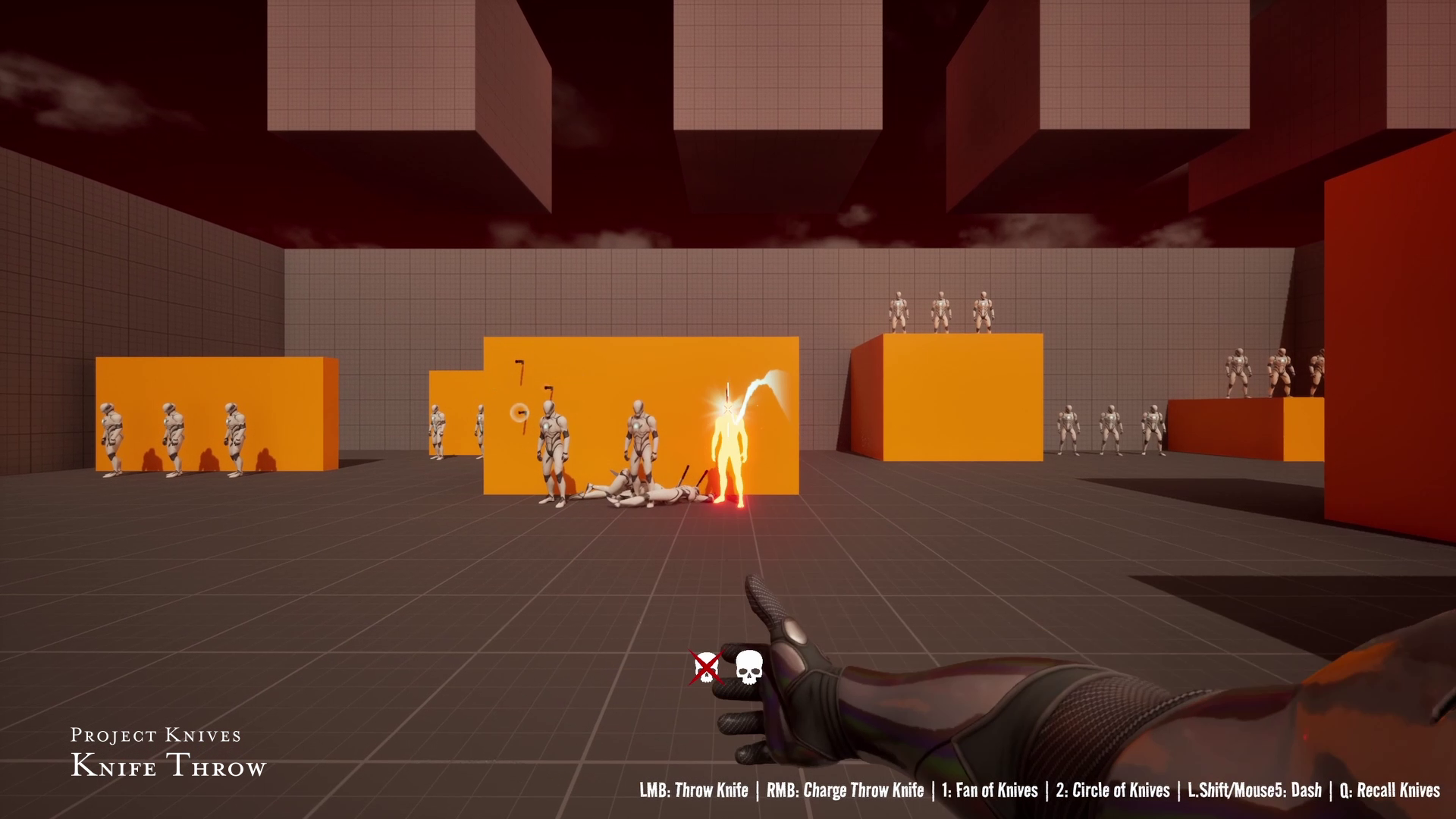
The Kill Tracker keeps track of kills that were made in succession. Whenever a kill is made, it starts a timer window. Once more kills are made, the timer is reset. Per 5 kills, we spawn a widget that populates up to 5 kills. Once it's full, we spawn a new one, that stacks under the old one. I animated it with a cross-out effect, indicating that a character was defeated.
Hit Marker
I often did damage with knives that were recalled, so I added a damage/kill marker on the curser, based on Overwatch's damage indicator. It pulses yellow when damage is dealt with an animation, and does a more attention-grabbing effect on kill in red.